Wednesday, December 24, 2025

Learning LabVIEW FPGA Scaling and Division

 The following two links helps to understand the LabVIEW FPGA scaling and division usage.

https://forums.ni.com/t5/Example-Code/LabVIEW-FPGA-Scaling-and-Division/ta-p/3996338

https://forums.ni.com/t5/LabVIEW/Dividing-in-FPGA/td-p/189324

Sunday, December 31, 2023

Speedup the VI's running inside loop_Inline sub vi

 Calling the sub vi's continuously inside loop makes sub vi over head. This causes delay in execution speed. To over come this issue we can make the sub vi as inline vi ( Refer following articles and discussion forum for more details). 

In one of our project we set both inline & subroutine VI properties (wherever possible) to increase the execution speed of sub vi. 

https://www.ni.com/docs/en-US/bundle/labview/page/vi-execution-speed.html

https://forums.ni.com/t5/LabVIEW/Inline-subvi/td-p/1279078


Wednesday, September 28, 2022

Solving ActiveX- Excel error -2147319784 & Crash Issue

 I was upgrading LabVIEW 7.1 code to LabVIEW 2020 (32 bit) which has activeX excel report generation.  Code upgraded for Win 10 OS 64 bit & Office 365 - 64 bitVersion. While executing the EXE in some other Win 10 OS with Office 365 version machine got Excel Error "-2147319784". 

To solve this issue ActiveX function used VI properties->Execution->Preferred Execution System changed to User Interface based on the https://forums.ni.com/t5/LabVIEW/What-is-error-2147417851/td-p/103921 forum suggestion. 

EXE crashes while generating Excel report in Win10-64 bit OS with Office 2016-64 bit machine. 

To solve this issue, we removed the “Save As” ActiveX function in code & replaced with Save function. After that it works in both Office 365 & 2016 (both 64 bit) with LabVIEW 2020 32 bit

Here development machine Office 365 version also important we used Version 1609

Hope this will help...

Monday, January 27, 2020

Tuesday, March 5, 2019

Add Enum Items programmatically

I learned some trick in ni website to add the items programmatically in Enum control. I am aware to perform the same using  panel control reference method using VI reference (https://forums.ni.com/t5/Example-Programs/Programmatically-Add-Elements-to-Enum-Ring/ta-p/3514584). But I preferred this method which is more simple & easy to code.
Here we need to add one Ring control & set the "Strings" property and run the code. Now Rig control will have the items which you set through "Strings" property. In front panel right click over  Ring control and replace the it with Enum control. Now Enum will have the all the items which was added in Ring control.


Sunday, December 16, 2018

Get Window Handle reference using windows API

We can get any windows task handle reference using user32.dll. For that we need to use the window title as a input for the user32 windows dll (We can call user32 dll using call library function node). I attached the code snippet & step by step instruction pictures for reference. Using the Window Handle reference we can programmatically perform some task in that window like minimize, maximize & close the window etc...


Tuesday, May 23, 2017

Tip of Case Structure using string selector


Today I learned a new trick about case structure. As we know, once we connect the numeric number in the “case selector” & if we use 1...4 in “selector label” that case will work for 1, 2, 3 & 4 inputs. Similarly if we connect string in “case selector” & if we use a..d in “selector label” that case will work for a, b & c inputs (not for d). Screenshot attached for this condition. One more point is, this will work on capital letters & small letters if we selected “Case Insensitive Match” option.

Wednesday, September 28, 2016

Automate text update in BookMark of MsWord using LabVIEW


I am uploading the VI snippet to automate the text update in the defined bookmark field of the Ms Word document.


Sunday, December 6, 2015

LabVIEW Keyboard Shotcut for Objects & Movement

Today I learned one hidden trick to scroll through the Event, Case Structure & Stacked Sequence. Most of us know Ctrl + Mouse Wheel shortcut used to scroll through the Event, Case Structure & Stacked Sequence states one by one.  But if we use Ctrl + Shift + Mouse Wheel it scrolls through every 5th case/Event/Sequence state (Like 5,10...) from the beginning state (0 state). It will work only if we have more than 5 case/Event/Sequence states. I verified this Keyboard Shotcut in LabVIEW  2009

Wednesday, November 25, 2015

Moving (Running) Average using LabVIEW function without loop

Today I learned one trick from NI discussion forum to calculate the Moving (Running) Average without using loop. FIR filter LabVIEW function used for this calculation. See the attached screenshot & VI snippet code below.


Monday, November 24, 2014

Strip a path using Build Path function

Today I learned one LabVIEW trick from my colleague Balaji. He showed me how to strip a path using build path function. I attached code snippets of the trick below.


Thursday, October 30, 2014

Remove duplicate element & Sort the Array

Using varient function we can remove the duplicate elements & sort the elements of the array (Numeric,String array...). You can find the varient functions like "Set Variant Attribute"," Get Variant Attribute" in block digraram-> Function Palatte-> Cluster,Class & Varient -> Varient (LabVIEW 2009). By using those function without implementing anyother logics we can achieve removing duplicate element & sort array. It will work in String,Numeric & reference array also. See the simple exampleVI snippet attached below.
Front Panel : 

 Block Diagram :

Tuesday, October 28, 2014

Automate Powerpoint Macro execution using LabVIEW ActiveX


Using LabVIEW ActiveX functions we can call the powerpoint library to execute the macro of the opened Powerpoint file (*.ppt). Example code attached as a VI snippet. This VI module is tested using MS-Office 2003.

Wednesday, December 25, 2013

Multiple Patterns in LabVIEW File Dialog Tool

To display the multiple pattern files in File Dialog window use the string format (In File dialog tool-> Pattern terminal) as shows in the below picture.This Example picture shows the text & document file pattern configuration.


Friday, September 21, 2012

Learn Xcontrols - Basic Tutorial & Example links

Tutorials :
http://www.ni.com/white-paper/3198/en
http://zone.ni.com/wv/app/doc/p/id/wv-2695
http://prolucid.ca/xcontrols-2/
http://labviewwiki.org/XControl
https://decibel.ni.com/content/docs/DOC-3623

Examples :
https://decibel.ni.com/content/docs/DOC-7391
https://decibel.ni.com/content/docs/DOC-22536
https://decibel.ni.com/content/docs/DOC-1180#comment-1111

Monday, May 30, 2011

Useful links to learn SQL & LabVIEW integration

http://www.1keydata.com/sql/sqlorderby.html

http://www.blackwasp.co.uk/SQLForeignKeys.aspx

http://sqlcourse.com/select.html

http://sqlzoo.net/select

http://forums.ni.com/ni/board/message?board.id=170&thread.id=433683&view=by_date_ascending&page=1

http://forums.ni.com/t5/LabVIEW/LabVIEW-DataBase-Connectivity-Toolkit-Cheat-Sheet/m-p/847481?jump=true

Tuesday, April 12, 2011

Launch the system module window using LabVIEW

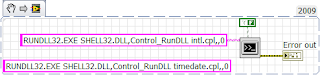
In LabVIEW, to launch the system module windows like regional & language option,Date & time properties use the "System Exec.vi" function. See the example VI snippet (LV 2009) for launch the regional & language option window.The non-connected string constant displays the command for launch Date & Time properties window.


Wednesday, January 12, 2011

Useful Links for LabVIEW Software Configuration Management

Use Graphical Merge To Combine Individual LabVIEW VIs
http://zone.ni.com/devzone/cda/tut/p/id/6212
Using new LabVIEW Merge Tool LVMerge With TortoiseSVN
http://expressionflow.com/2007/08/28/using-new-labview-merge-tool-lvmerge-with-tortoisesvn/
Using Source Code Control with LabVIEW 7.x and Perforce
http://zone.ni.com/devzone/cda/tut/p/id/4631
How do I use Subversion (SVN) and TortoiseSVN for source code controlling LabVIEW projects
http://digital.ni.com/public.nsf/allkb/C751F800E258087B86257535006DB160
LabVIEW & Mercurial
http://www.labviewwiki.org/Mercurial
Removing svn folders from a working copy with tortoisesvn
http://thinkinging.com/2008/09/23/removing-svn-folders-from-a-working-copy-with-tortoisesvn/
Source Code Control and Group Development Practices in LabVIEW for Advanced Configuration Management Tasks
http://decibel.ni.com/content/docs/DOC-2936
The easiest way to use TortoiseSVN in your LabVIEW™ projects
http://jki.net/tortoisesvn-tool
Integrate Graphical Diff with Subversion Source Code Control
https://decibel.ni.com/content/groups/large-labview-application-development/blog/2011/03/16/integrate-graphical-diff-with-subversion-source-code-control#comment-16435

Wednesday, July 7, 2010

Find Average(Mean) for 2D array values

There is an easy way to find the mean(average) for 2D array values without using any loop. The function name is A x B.vi which is located in the mathematics->Linear Algebra->A x B.vi.
See the picture to find the average for Row of 2D array values.To find the average for column of 2D array values just use Transpose 2D Array function on the 2D array input.